Configuration Management
Part 1 Chapter 4
Configuration Management is about preventing issues caused by incorrect settings. ensuring the actual configuration settings matches the intended or desired value. The configuration of hardware and software products must be identical with the documented systems architecture.
We should be able to quantify configuration manage. This makes it easier to track over time. We can assign 100% where there is no configuration issue, and 0% where none of your desired configuration rules are being followed.
Approach
Configuration management starts with a plan, where you decide what settings are suitable for what objects. So have your plan documented as corporate standards.
The actual configurations you have in production should reflect your current architecture standard and security policy. Your architecture or standard may change over the years, but it should be documented. You then use the configuration dashboards to compare the reality versus intended standard. If they differ, one of them is wrong and needs to be addressed.
Standards make operations simpler and are often required for compliance. For example, you have a standard for VMware Tools versions, and you choose one version as your standard, but allow 2 other versions across your environment as it takes time to upgrade. You can create a pie chart showing the distribution of VMware Tools version. Each slice in the pie chart counts the occurrence of a particular value. You should expect to see only three slices. If you are seeing more than three, then the reality differs to your standard.
The plan should cover beyond VCF due to dependency. For example, ethernet jumbo frame needs to be configured end to end, including all the physical switches in between. Settings must also be checked across the entire stack, especially the lower layer as problem in a layer will impact the layer above it.
The challenge is balancing conflicting requirements, while meeting constraints such as cost and capacity. For example, you may have to mix different classes of service in a single cluster. Compromise like this makes configuration management essential.
It is a never-ending job as you need to keep up with the versions and product end of life.
Wrong configuration can be costly. There are 6 areas of operations that could be impacted, so choose your trade off carefully.
-
Availability
-
Performance
-
Capacity
-
Cost
-
Security
-
Compliance
In addition, there are VCF product specific settings that need review, such as:
-
License.\
Make sure you have the correct amount for each type of license.
-
Certificate.\
Many parts of VCF have different expiry dates.
-
Configuration Maximum.\
This is especially relevant in a very large deployment where you hit the limit of VCF scalability.
-
Users and roles.\
This includes the service account and locally-defined account.\
This includes password management.
-
Log.\
ESXi, vCenter, NSX, etc. are configured to send the correct type of logs.
-
Compatibility\
As you need to eventually patch and upgrade, this becomes a cycle.
Purpose-driven Architecture
How do you reflect the business in your private cloud architecture? How does the architecture enable an application-centric operations, where everyone can see the business divisions and their applications?
My answer is a top-down tagging.
Label or Tag
Label is type of property. It is always external. We attach is to an object. It’s added onto the object as part of its creation or during its lifecycle.
Let’s take an ESXi host as an example:
-
The serial number is not a label.
-
The location is a label. It’s added by someone, manually or via script.
Tag gives context to various persona running your operations. The context is important. Many customers struggle with tag management as it spans many parts, across software and hardware from all the vendors that you have in your environment.
Label needs to be designed top down so tags are complete and correct.
Categorize your tag, so it’s easier to manage them. There are customer-facing tags, and internal-tags.
Business Tags
These are the tags that application team or your customers care. Have an agreement with them. Note that different department will have different requirements, but you only have 1 set of tags, so have a company wide proposal before meeting each group.
Example tags:
-
Cost Center. This enables chargeback and reporting
-
Class of Service
-
Department. Map this to vCenter folder
-
Owner email.\
At the very least, you need the email so system can automatically notify them and ask for approval. In large organization, even a full name may not be unique
-
Owner phone.\
For mission critical VM where you need to contact urgently or after office hours.
Balance your tag. Too many tags and it becomes a challenge to update them. For example, if you have 10K VM and each VM is tagged with the direct, actual owner, you can end up with hundreds of names. These people may change department, role, or leave. It’s easier to establish a business agreement where you have 1 contact person per department
IT Tags
These are the internal tags for your infrastructure team.
Example tags:
-
Refresh Date.\
The date or month or quarter where the hardware is due for a tech refresh. Use the end of warranty as a consideration, and establish a policy on when to upgrade.
-
Class of Service.\
For VM, this is inherited from the cluster where the VM is running. It’s automatically updated for new VMs or relocated VMs
-
Location.\
For hardware, it helps to know the physical location within a DC floor.
-
Importance.\
I prefer this terminology over criticality as criticality mixes urgency and importance.\
Give a clear but short name such as high, medium, low.
-
Environment.\
Example values: Production, QA, Test, Development.
Implementation
Use the VCF Operations custom property as opposed to vSphere tags and annotation. These two features were designed much earlier and have limitations, all of which were addressed by VCF Operations. For example:
-
Limited to vSphere only. Can’t cover Horizon, AWS, Microsoft, business applications, etc.
-
Historical data not kept. You don’t know what the previous values are, when it changed and who changed it.
-
No dynamic membership. Can’t automatically assign to objects that meet selected criteria, and membership do not automatically update.
-
Values are all strings. You can’t do numerical computation on them even if the values are actually numbers.
-
The values in vSphere annotations are free-style string, meaning you can’t control the consistency of the content. On the other hand, vSphere tags have rigid value. You can’t type a value; it has to be chosen from predetermined list. It is not practical with information such as phone numbers, as they’re likely unique.
-
Tags are per-vCenter, so you need to maintain copies across all vCenter servers.
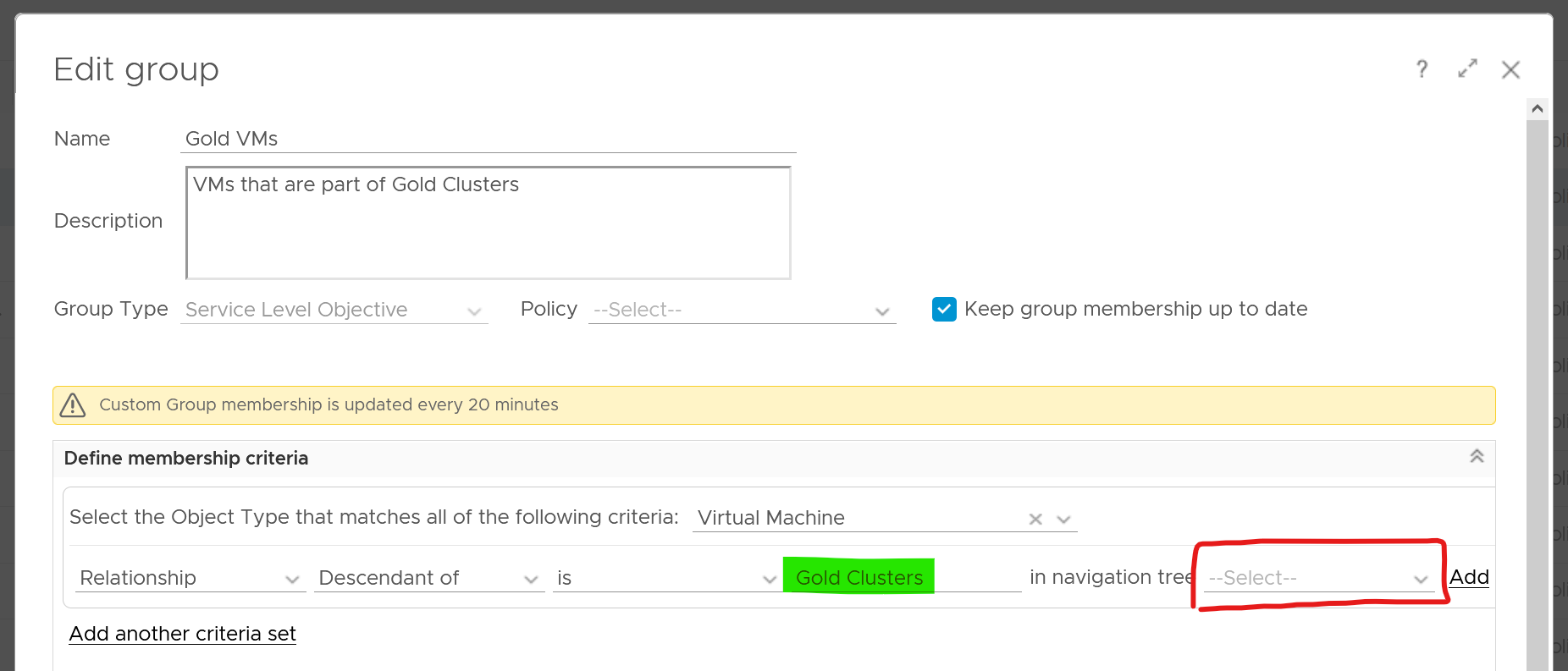
The following screenshot shows how to dynamically tag all VMs that are in Gold Clusters as Gold VMs. Gold Clusters are in turn a custom group whose members are clusters that provide the gold class of service.
Naming Convention
Have you ever heard of stories of changes being made by accident to the wrong VM or ESXi host or LUN because their names are similar and hard to read?
Yup. We all have been there 😊
Is the VM naming convention easy to understand yet hard to make human error? How about the Guest OS naming convention?
Does the VM name and Guest OS name map? Is it easy to figure one from the other?
Guidelines for naming convention:
-
Make it easy to understand the business context (especially useful for new staff).
-
Reduce the chance of making human error (e.g. typo).
-
Reflect the criticality of the VM (class of service).
-
Provide some context (e.g. name of department owning it).
There is no need to provide the owner information in the name as it’s already covered via custom property and vSphere folders.
Design a naming convention for the following:
| Category | Object | |
|---|---|---|
| Consumer | Guest OS | Ideally there is a way to map it to the VM, so keep them fairly similar. For example, WIN for Windows family, and LNX for Linux family. Avoid LIN as that is too close to WIN, both in spelling and in pronunciation. |
| VM | Typically this would be the same as the OS hostname for manageability reasons. It should have the owner ID, such as the department code. | |
| RDM | Design them as one set. Make sure the name is unique across multiple physical arrays | |
| vVOL | ||
| Provider | Resource Pool | It should have the parent cluster it belongs to |
| ESXi | it should have reference to the physical location (rack, row, floor) of the box. | |
| Cluster | Class of service | |
| Datastore | ||
| Datastore Cluster | ||
| Distributed Port Group | Designed them as one set. The port name should tell which switch it belongs to. | |
| Distributed Switch | ||
| vSphere | Folder | Make sure the 4 types of folders have unique and easy naming convention. It has to be unique across vCenter servers. |
| Data Center | It should | |
| vCenter | ||
| vSAN | Fault Domain | |
| File Services | ||
| NSX | NSX Edge | Avoid including the size as it may change. |
| NSX Manager | ||
| Logical Switch | ||
| Group | ||
| Kubernetes | K8 Container | Designed them as one set. Make sure the names are unique across K8 clusters. It should have the business owner ID. |
| K8 Pod | ||
| K8 Workload |
Example
The name should reflect the object. This is less important in the UI as have you the context. But in code (programming), it helps to know what object you’re dealing with to reduce human error.
Here is naming convention I’d use for cluster and datastore name.
| Part | Value | Meaning | Reason |
|---|---|---|---|
| Class of Service | GLD | SLV | BRZ | Gold, Silver, or Bronze | I use this as the first part of the name as it’s the most important one. I avoid Tier 1, Tier 2, Tier 3 as it could be unclear if Tier 1 is higher than Tier 3. Also, they also differ by 1 character, which is prone to human error. |
| Location | SGP | SFO | The physical location of the | This does not change. Typically, it’s a city. For stretched clusters – clusters spanning two cities or availability zones within a region – suggestions for the location code include:
Different options are suitable for different scenarios depending on your business and where you operate IT infrastructure. |
| Environment | PRD | DEV | Production, Development | Different treatment or context. |
| Serial No | 1 | No meaning | Just in case you need to have more than 1. Note if you have 3 digit it increases the chance of making a mistake. Think of a way to group them. |
Using the above, you get names like VMW-CLS-GLD-SGP-DEV-1 for the first vSphere gold cluster in Singapore serving development workload, and VMW-CLS-SLV-SFO-PRD-9 for production silver cluster no 9 in San Francisco. I added VMW as you may have non-VMware platforms (such as AWS or mainframe) in your environment.
I’d add LOCL for local datastore, VSAN for vSAN, VMFS for networked VMFS and NFS for NFS type. Raw Device Mapping LUN should have RDM or VMW, whichever easier for your storage team
Don’t be hesitant to use dash or underline as they make names easier to read and provide a good delimiter to use in code when managing environments through automation.
Review Approach
There are literally thousands of settings that you need to manage. How do you know you cover them all?
Focus on the impact to day-to-day operations a product has, rather than the feature of the product itself. Take the view from Day 2, not Day 1. Products under monitoring, such as vSphere and vSAN, can have features that are related, but have different impact to operations.
VCF Operations takes the principle that there are different impacts to operations, and applies a methodology for looking at configuration. It does not group the settings by features or objects. Rather, it begins with the impact in mind, and prioritize what can be done.
There are 3 dimensions to consider, resulting in 3 ways to review. Use all 3 to ensure completeness.
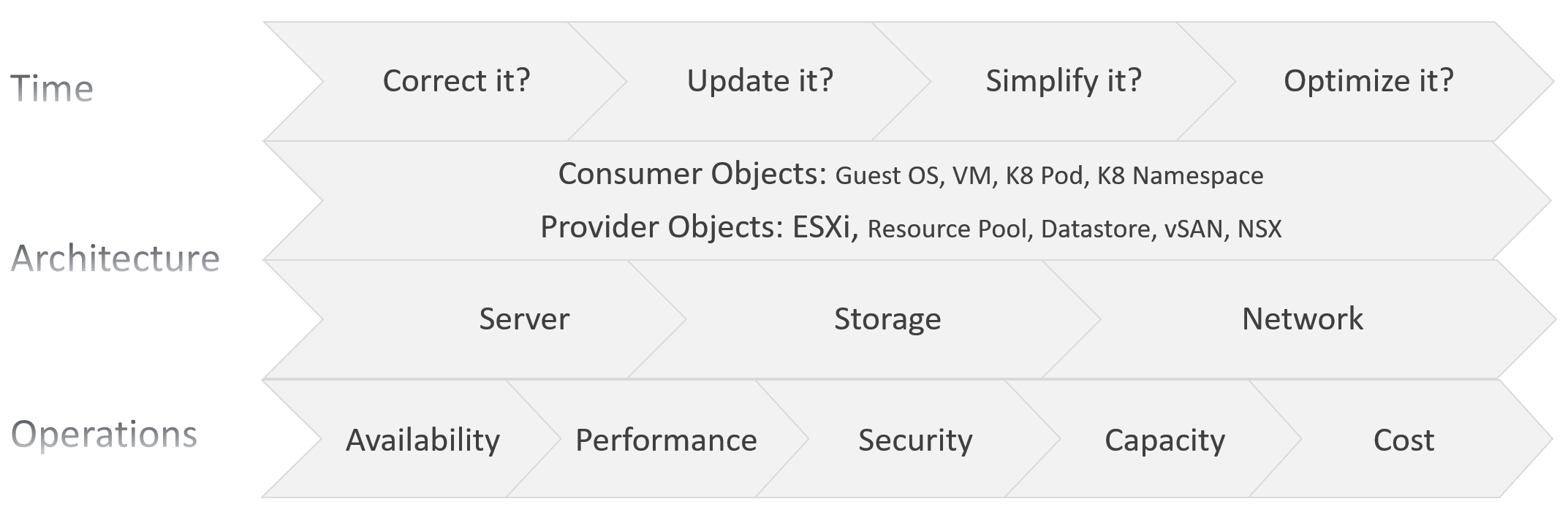
The first one is based on time. You assess the most pressing issues first. You also check them more frequently. Use a 4-step check, starting from the most urgent.
The second one is based on the SDDC architecture. There are 2 types of objects, consumer and provider.
-
Both are equally important.
-
Consumer is important as it’s what your customers care.
-
Provider is important as it can impact many consumers.
As VCF is a type of SDDC, you can review from the 3 types of infrastructure:
-
Server or Compute. This covers CPU, GPU, and memory.
-
Storage. The stacks start with Guest OS partition 🡪 VM virtual disk. From here it covers technology such as ESXi storage subsystem, datastore, RDM, vVOL, and vSAN.
-
Network.
The last one is based on the pillar of operations.
-
The first to check is availability, as it’s the most basic. If the system is down, other problems become irrelevant.\
For hardware, higher availability is achieved via redundant component.\
For software, higher availability is achieved via clustering technology, with 2 load balancers fronting the nodes of the cluster or farm.
-
Just because something is up, does not mean it is fast. This is why performance is second. You check for configuration that impacts performance.
-
Just because something is fast, does not mean it’s secured. This is why a Security and Audit come into play.
-
Other areas of pillar operations worth checking is capacity, cost and sustainability.
Time-based Approach
| Step 1 | Address settings that are incorrect, insecure, not following your corporate standards or against best practice. You should correct them as appropriate. This is typically the most urgent step. |
|---|---|
| Step 2 | The settings are correct, but on older version. It’s hard to keep up with all the vendors releases, so you should prioritize those oldest versions, especially those no longer supported. As part of operations best practices, keep the infrastructure up to date. Running outdated components that are too far behind the latest version, can cause support problems or upgrade problems. It is common that the fix for the problem is only available in the later versions. Outdated hardware can also result in higher operating costs. Outdated hardware might cost more data center footprint, such as rack space, cooling, and UPS. Refreshing your technology and consolidation are two common techniques to optimize cost. A typical SDDC or EUC architecture spans many components. While each can run the latest version, they may not be compatible or supported. |
| Step 3 | The settings are correct and up to date, but they complicate your IaaS operations. Since you are unlikely to eliminate them all, establish policy that minimize them as part of simplifying your operations. Complexity can come from many things, lack of standard being one of them. Think of the standards in your SDDC architecture or EUC architecture, and customize the configuration dashboard to shine light on the issue. I think having flexible VM vCPU and memory size do not create complexity, as the permutation is not something you manage. |
| Step 4 | The last step is about cost and capacity, as there is nothing wrong already. You want to maximize the usage of your resources while minimizing your cost. It’s a balancing act! |
The 4 Types of Check
Checks are performed to ensure you comply with best practices.
You can categorizes check into 4:
-
Value Check, where you compare a single item against a desired value. The desired value can be static or universal, or relative depending on the context.
-
“Multi Object" check, where you compare multiple items against one another. You can check them for consistency, for compatibility, and for contrast (read: variance)
Value Check
You compare its value against the desired value. The desired value depends on the type of check:
| Against Standard | Naming convention. Compare the name against your corporate naming standard. |
|---|---|
Logging standard. This applies to system such as Windows, Linux, ESXi, VCF Appliances, NSX Edge. For critical VMs, consider logging to capture errors that do not surface as metrics. These errors typically appear as events in the log files, or Event database it the case of Microsoft Windows. Use Log Insight to parse Windows events into log entries that can be analyzed. | |
| Against Version | It needs to be minimally supported by the vendor. Compare the product version against your corporate standard. Aim to have N and N-1 only. |
| Against Date | Expiry date, which should cover:
|
| Against Threshold | Absolute threshold. Example is the configuration maximum. Note this can vary depending on the combination. |
| Relative size, which depends on the parent “container”. For example, a relatively large Linux container in a Kubernetes Node can cause performance issue to other containers and itself. |
Consistency Check
| Against Peer | This is about consistency among members of a group. For example, all the ESXi hosts in a cluster should have identical configuration. |
|----|----|
| Against Partner | This is about consistency with adjacent connection. For example, ESXi MTU setting should match DVS MTU setting. |
Compatibility Check
While consistency is about identical value, compatibility is not. Most of the time, the values are not the same.
Think of “what works with what when and where”.
-
You’re running hardware and software from multiple vendors, and they don’t always work best in every possible permutation. Pay attention to the detail, minor version number too.
-
Upgrading one component often requires upgrading adjacent products.
-
What is right for development environment may not be appropriate for production. In the same production environment, what was suitable last year may not be suitable this year.
Variance Check
Too many variants happens when you want to achieve flexibility. There is a cost of complexity as the number of variants increases. The complexity can manifest in security, capacity, compliance, performance, or just day to day operations as your team have to be aware of myriads of things.
-
Guest OS
-
VM
-
ESXi
-
Server BIOS
-
vSphere Cluster
-
Storage
-
Network
Take note that some variants do not create operational complexity. VM sizing is one such example. Having a t-shirt sizing costs wastage with little benefit of operational overhead.
Review List
It’s difficult to logically list as a setting typically has multiple sides. Take for example, do you put NFS security setting under Storage, Datastore, or Security?
In this section, I group them based on the object. In the case of NFS, it will appear in both ESXi and datastore objects.
Before you review the settings, review the name first. Ensure they follow the naming conventions. There is a chance it’s not adhered to.
Consumer Objects
Guest OS and VM are separate as they have their own set of requirements. In large organisation, there could be 2 separate team responsible for each.
Guest OS
| Type | The actual Guest OS may not match the type specified during VM creation. This could be due to Guest OS upgrade, or reformat. Update the value in vCenter to avoid confusion. Do this by comparing these 2 properties:
|
|---|---|
| Version | Are there outdated Windows or Linux version? |
| Too many versions of Linux distros. Within the same versions, minimize the build numbers and patch level. | |
| Too many versions of Microsoft Windows. Within each edition, too many editions | |
| Driver | Is PVSCSI used appropriately? |
| VMXNET3 or PVRDMA or SR-IOV used appropriately? See this for networking driver best practices. | |
| Agents | Are they too many agents? Back up agent, security agent, monitoring agent? What’s their total footprint (since they are overhead)? If you use agents, such as Telegraf agent and Log Insight agent, ensure they are installed only in the correct VMs, are up to date and collecting properly. |
| Windows Drive | Consistent purpose of each letter. For example c:\ drive should always be for OS only. |
| Consistent usage of temp drive. | |
| Consistent usage of data drive. Since you do not know how many each OS will have, you can start with Z:\ and go backwards. | |
| Application | You want to avoid flying blind. After all you have some responsibility for everything that runs on your platform. Just because the VM name or hostname say webserver does not mean it’s running web server. Using tools such as Telegraf or Service Discovery, find out what application (key process) are running and who is it talking to. Since your workloads are sharing resources and are over committed, your operations are easier if you know what is running inside. This helps with monitoring and troubleshooting. It is also required by some ISV for software licensing. |
| Java Virtual Machine or Database with memory allocation too large relative to Guest OS. Unless you’re running other application, the extra memory is not accessible by the application. | |
| Settings | Too many configuration setting options in your corporate standard. |
| Disable screen saver as it’s irrelevant for server OS |
Tools
I single out Tools as it’s an essential piece, required when running workload on VCF.
Using VMware Tools has multiple benefits, such as driver and observability. For the list of benefits, refer to KB 340.
For more information about VMware Tools, see the VMware Tools documentation.
| Existance | Are Tools installed on all VMs? The lack of support from Independent Software Vendor (ISV) owning the application is the most common reason that VMware Tools is not installed in the Guest OS. The ISV vendor may claim that no additional software is installed in their appliance unless they have certified it. |
|---|---|
| Availability | If yes, are they running? If VMware Tools is installed, there might be reasons why the application team disables it. The infrastructure team should inform and educate their application team, and document the technical recommendations on why VMware Tools is needed to run at all times. |
| Version | If yes, are they up to date? Compatible with the VM hardware version? |
| If you are running older version of Tools, you may not have the following Guest OS performance metrics: CPU Run Queue, CPU Context Switch, and Disk Queue Length, Memory Used | |
| Too many versions of Tools. Newer versions tend to have better observability |
VM
| Version | Are there outdated VMX hardware versions? |
|---|---|
| Too many versions of VM hardware | |
| Advanced Setting | Minimize the usage of advanced parameter setting. Ensure modification complies with your standard. |
| Multi Network | Are there non-networking VM spanning >1 network? A VM that has multiple network interfaces can bridge the network, causing security risks or network issues. Take note that a VM that is part of multiple networks can do so with just a single NIC card. A single NIC can be configured to access multiple networks, with each interface having their own IP configuration. |
| Driver | Is it correct? Up to date? |
Compute-related
| Relative size | Ensure that the VM size does not exceed the size of the underlying ESXi host. If your ESXi host has CPU hyper-threading, do not count the logical processors. Instead, count the physical cores only. |
|---|---|
| NUMA | If the number of configured vCPUs on a VM is higher than number of cores per socket on the ESXi, the VM can experience NUMA effect. If the ESXi has more than one physical CPU (socket), cross-NUMA access negatively impacts performance. For best performance, keep it within the CPU socket. |
| Modern CPU die consists of multiple chiplets. For example, a 64 core CPU is made of 8 x 8-core chiplets. Each chiplet has its own cache. In this case, any VM greater than 8 vCPU will spread over multiple NUMA nodes. | |
| vSocket and vCore configuration. Does it match vNUMA best practices? | |
| Large VM | The larger the VM, the longer time is required to vMotion, Storage vMotion, and backup. |
Are there monster VM? Large VMs that are running hot can impact the performance of other VMs, especially since they are given higher shares by default. Only when the large VM is under-utilized, can the ESXi run other VMs. | |
| Hot Add | CPU Hot Add and Memory Hot Add. Are those applied at the correct VMs? CPU Hot Add results in NUMA optimization disabled. So memory is being interleaved between the nodes. Hence, only use Hot Add if the benefit outweighs the cost. |
Storage-related Configuration
| Virtual Disk | For disk space, if the disk is thin-provisioned and under-utilized, you can deploy other VMs in the same datastore. Ensure that the snapshot is tracked closely, as the risk of capacity running out is higher for a large virtual disk. | |
|---|---|---|
| What is the unmapped reclamation opportunity? | ||
Monitor at virtual disk, not VM. Each virtual disk must be monitored in terms of IOPS, throughput, and latency. Having multiple virtual disks increases the monitoring and troubleshooting need. If the reason for having many virtual disks is performance, identify which counter serves as proof that multiple virtual disks are required. It is possible that the performance required is met by a single virtual disk. | ||
| Snapshot | Ensure that the snapshot is removed within one day after the change request. If not, it might be forgotten, resulting in a large snapshot and impacting the performance of the VM. | |
| Disaster Recovery | Incorrect vSphere replication setting. One reason is the VM Owner never informs infrastructure team on the changes. | |
| Are all the VMs protected by SRM meant to be protected? Some VMs could be no longer use but are still protected. Review the Recovery Plan. How frequent was it run and when was the last run? | ||
| Fault Tolerant | Any feature, especially something as powerful as this one, comes with its own set of complexity. So make sure the VMs with FT are the correct VMs. | |
| vVOL | Is the usage following design best practice? | |
| Shared Disk | Are there VMs sharing VMDK or RDM disk? | |
| Guest : VM mapping | It is simpler to have a 1:1 mapping between Guest OS partitions and the underlying virtual disk (VMDK or RDM). While you can run logical volume at Windows or Linux level, it creates complexity. | |
| VM : Datastore mapping | Minimize VM that spans multiple datastores. This can make performance troubleshooting and capacity planning difficult as you create a M:N relationship between VM and datastore. | |
| RDM | Keep the usage minimal as they result in LUN sprawl and unused RDM object in the physical array | |
| Are they excessive usage, where RDM is used when there is no need to? | ||
| Are they unused or hardly used RDM? | ||
| Are they oversized RDM? | ||
Resource Management
I highlighted this separately as its flexibility need to be managed carefully. It’s hard to keep the settings fully consistent in a large environment over the years.
vSphere provides powerful control over infrastructure resources. You can apply shares, reservation and limit. As feature, they are closely related, appear in the same dialog box in vCenter client UI and should be mastered as one. However, they impact operations differently. The following table describes that in more details.
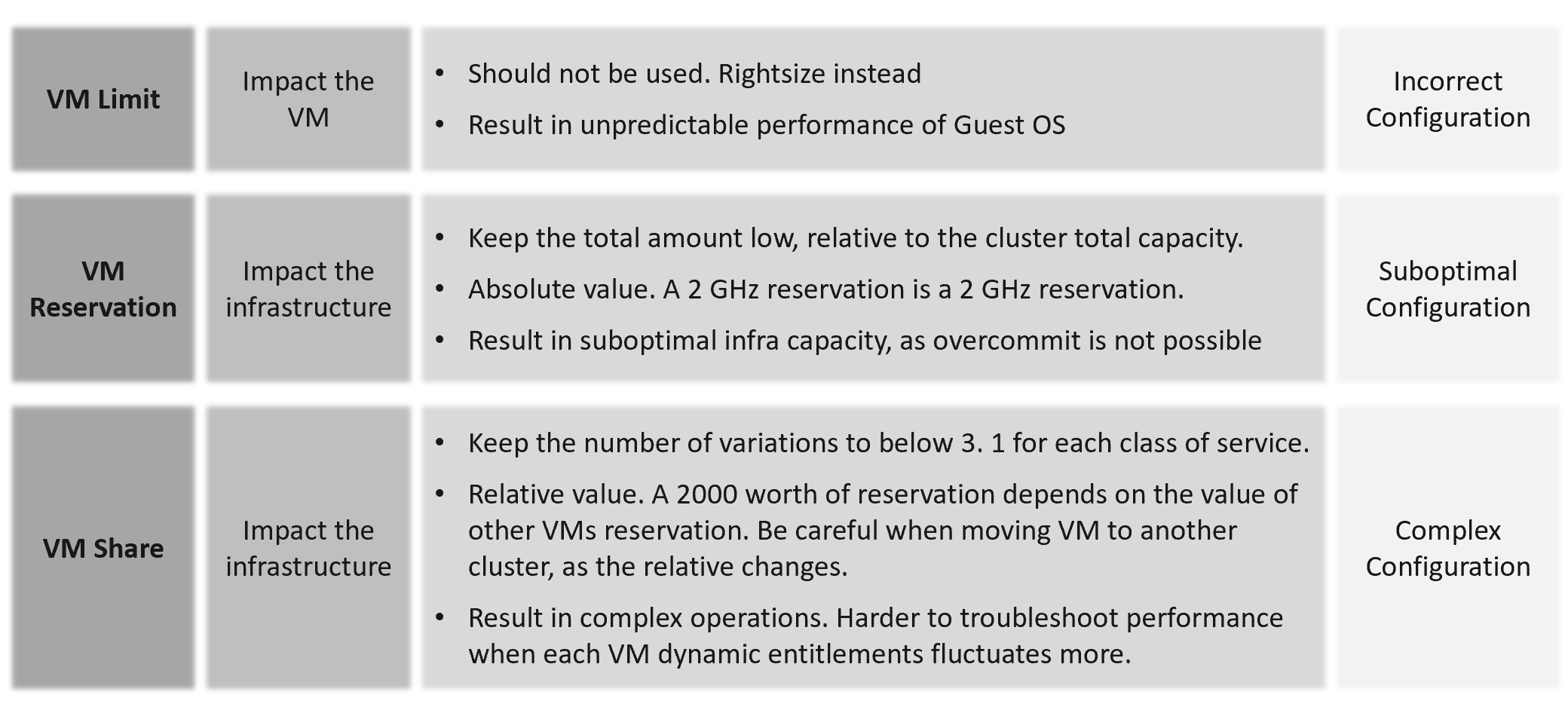
| Control | Analyzis |
|---|---|
| Limit | The most basic form of control. It sets the upper limit that the consumer can’t exceed. It is a hard limit. It is more relevant in container as by default it has no upper limit. With limit, if the underlying shared resource is available, it will go wasted instead of being used. On the other than, this guarantees that consumer will not exceed what they pay for. You can also contain the damage of denial-of-service attack. From the above, you can see it cuts both ways. You need to balance cost and performance. |
| Reservation | Complement limit by setting the floor. This is also another form of guarantee, so your total reservation cannot exceed your total capacity. Take note Disk has no reservation for IOPS and throughput. |
| Share | Share is only effective if there is enough resources left to share. If you have 80% reservation, then you only have 20% left to share. The 20% is only effective if the demand is larger. Share is relative to the configured size. A VM that is 10x bigger is given 10x shares by default. |
Imagine a host with a fixed capacity of 10 GHz. Two VMs are running on that host, one with a single vCPU, and one with two vCPUs. The single-vCPU VM will have 1000 shares. The two vCPU VM will have 2000 shares. Both VMs want to consume 10 GHz. Ignoring overhead, you could expect the VM with a single vCPU to get 3.33 GHz of a physical CPU, and the VM with 2 vCPUs to get 6.66 GHz of the physical CPU. On the other hand, imaging both VMs only need 5 GHz. In this case, VM 1 gets 5 GHz and VM 1 gets 5 GHz. |
Share
Shares values are relative, meaning the value depends on the value of sibling objects such as, resource pool or VM.
Here are the default values for VM:
| | vCPU | Memory |
|--------|------|-----------|
| Low | 500 | 5 per GB |
| Normal | 1000 | 10 per GB |
| High | 2000 | 20 per GB |
Here are the default values for Resource Pool:
| | CPU | Memory |
|--------|------|---------|
| Low | 2000 | 81,920 |
| Normal | 4000 | 163,840 |
| High | 8000 | 327,680 |
I’m unsure why a resource pool CPU is 4x VM but memory is 16x. This means a VM in a resource pool can potentially get 4x for CPU and 16x for memory, relative to VM outside the resource pool.
A VM 2x larger should have 2x share, all else being equal. If you right size VM manually via vSphere Client UI, it auto adjusts the share. If you do via API, it does not. Check those VMs whose share you manually change, to ensure the number is still valid.
Cluster with many VM Shares (normalized per vCPU and per GB RAM) makes performance troubleshooting harder. Each share should map to exactly one class of service, such as one for Gold and one for silver, as the shares defines the class of service.
If you move VM across clusters, ensure that the values of shares are consistent across clusters to avoid unintended consequences while moving the VM to another cluster.
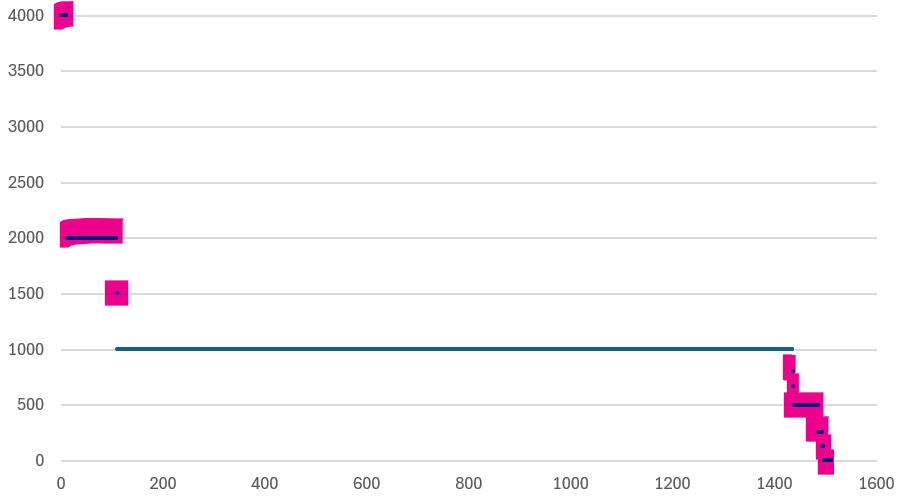
Check for VMs whose size are not aligned with their share. On a regular basis, ensure the share value per VM vCPU = 1000 and per VM GB of RAM = 10240. I downloaded a list of VMs into a spreadsheet. For a sample size of just 1500 VMs, I see incorrect values such as below.
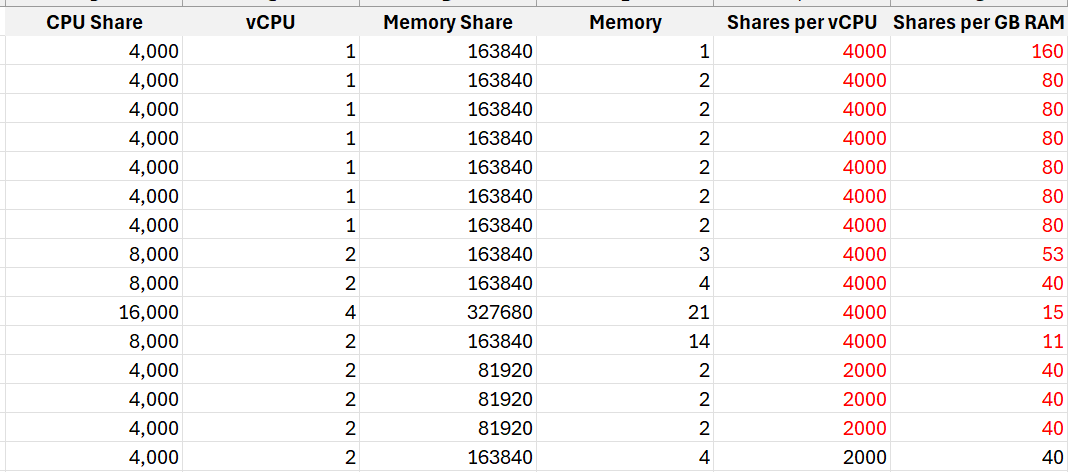
I plotted the values over a scatter chart and see there are both too big and too small.
Reservation
It limits your ability to overcommit, resulting in less optimal usage. High total reservation, especially both CPU and memory, also complicates the cluster operations as it impacts the HA slot calculation and limits the DRS choice of placement.
Any relatively high amount of VM reservation? If yes, this will impact the HA Slot Size. Large amount of CPU and memory reservation impact the cluster capacity, so use it only for important VMs.
Do you specify it at each VM, or at the parent resource pool?
There are pros and cons.
For VMs that belong to the same application, specifying the reservation at the resource pool is easier.
Limit
Are there VMs with limit? CPU limit and memory limit can result in unpredictable performance. You should downsize the VM instead.
CPU, Memory and Disk IOPS Limit. There is no network limit.
Avoid using limit as it can result in unpredictable performance. The Guest OS is not aware of this restriction as it is at the hypervisor level. It is recommended that you shrink the VM instead.
Limit has a valid use case in Resource Pool. If the tenants only buys 1 TB of RAM, and the contract does not include burstable capacity, set a limit. This will prevent consumption beyond the sold capacity.
Resource Pool
Use resource pool sparingly. It should only be used when selling Resource Pool as a Service.
Shares and reservation settings in resource pool and VM need to be looked together, especially in scalable setting.
| Children | Resource Pools shares do not match the number of VMs. The resource pool value is divided and shared among the VMs. The more the VMs, the lesser the resources allotted to each VM. This can be solved by turning on scalable share. |
|---|---|
| Ensure the RP setting is not causing the shares or limit issue to children VMs. This can be tricky in large cluster with many hosts as the RP metric is at cluster level, while a VM is running on 1 host at a time. | |
| Sibling | Resource Pool with VM as sibling is a common mistake. Once you create the first resource pool, you must create at least another resource pool. A single resource pool with no peers makes no operational sense as it’s not a folder. Since no VM should be peer to it, you need at least 2 resource pools. |
| Compare the relative values across sibling resource pools. If Gold resource pool should have 2x the share of Silver resource pool, then its value has to be 2x. | |
| Cascading | Any cascading resource pool? If yes, what’s the reason for it since resource pool is often mistaken as folders? Avoid further splitting into sub resource pools. Each layer increases the complexity of performance management. |
Compute
ESXi
| Hardware | Are there too many variations of server hardware vendors, models, and generation? Even within the same model and generation, minimize the specification difference. |
|---|---|
| Are they outdated hardware? Which model is entering end of support? | |
| Version | Are there outdated ESXi versions? |
Too many ESXi software versions? For each version, are the update and patch levels consistent? | |
| CPU | Older generations. Too many variants. |
| CPU architecture. Impact NUMA size and type of workload (Intel P-core and E-core) | |
| HT exists but not enabled | |
| Low frequency. This impacts performance of CPU intensive application. | |
| Memory | Are there too many size variants? |
| Is the CPU: Memory ratio supporting the workload? The general rule of thumb is 1 vCPU gets 4 GB of RAM. So a machine with 64 cores 128 threads get 512 GB of RAM. | |
| If performance is more important than cost, then do not disable large page. | |
| BIOS | Are there outdated BIOS versions? |
| Are the settings consistent, especially within a cluster? | |
| Power Management | Unless the workload requires it, BIOS level should be set to OS managed. Pass the control to ESXi, and then set ESXi to balance. |
| Availability | ESXi is in one of these situations:
|
| Standalone ESXi | |
| vMotion disabled | |
| Security | Direct Console UI is enabled |
| SSH is enabled | |
| Shell is enabled | |
| Encryption not enabled | |
| Capacity | A small host faces scalability limits in running a larger VM. While a 2-socket, 32-cores, 128 GB memory ESXi can run 30 vCPU, 100 GB memory VMs, the VM experiences a non-uniform memory access (NUMA) effect. |
| ESXi with Hyper-Threading Disabled. While it provides a more predictable performance to the VM, it comes at a high price. | |
Low CPU core counts. Aim for 48 to maximise software license. This limits the ability to run larger VM. | |
| Low total memory. Include vSAN ESA and NSX in the sizing. | |
| Insufficient network capacity. Include vSAN ESA and NSX in the sizing. | |
| Too many variants of the above | |
| Advanced Setting | Minimize the usage of advanced parameter setting. Ensure modification comply with your standard |
| Avoid CPU Affinity | |
| Unused device such as DVD-ROM, USB are disabled |
Management
| Configuration profiles | Is it used correctly? |
|---|---|
| Log | Use VCF Operations Logs as it has VCF specific log analyzis with extracted fields. The fields are used in out of the box dashboard and alert. |
| ILO | Is lights out management configured? If yes, are they secure? |
| Agent | Any 3rd party agent installed? |
| NTP and DNS | Ensure both Network Time Protocol and DNS are configured. Incorrect time can turn logs from useful to potentially misleading. Logs are a necessary component of operations, and are the main source of information in troubleshooting. While troubleshooting performance across objects, the sequence of logs determines which event is the likely root cause as the oldest event started the chain of events. |
Storage Related
| HA | Is the HBA configured for high availability? |
|---|---|
| Paths | Incorrect multi-pathing setting. |
| Too many storage paths. While redundancy is good, having too many may not bring the result you expect. Compare this with airplane with 2 engines versus 4 engines. | |
| Single path | |
| Zoning | FC or iSCSI LUN zones follow best practice, such as single initiator zoning. |
Network Related
| HA | Is the HBA configured for high availability? |
|---|---|
| Technology | Actual network speed is lower than configured. This happens due to auto-negotiation, which could happen due to high dropped packets. |
| Older generations, such as 10 Gb and 1 Gb ethernet | |
| Static IP | Any ESXi using dynamic IP address? |
| Consistent Address | Is the network address following easy to understand pattern? Since your ESXi hostname will have some sequential number, make sure this number matches the IP address. This will minimize human error. |
| Consistency across network, on the same ESXi | |
| Consistency across ESXi hosts, on the same network | |
| Capacity | Is the actual throughput the same with the configured speed? Auto-negotiate can result in reduction of speed in order to preserve connectivity. |
Any network on 1 Gbps or 10 Gbps? Other than management network, all other networks should be on 25 Gbps. | |
Is there enough capacity for the purpose? What’s your sizing for NSX Edge cluster? It should be greater than the sum of all NSX Edge VMs on the host + vMotion + vSAN. | |
| Kernel Network | Are the following kernel traffic separated: • Management • vMotion • IP storage • vSAN • vSphere Replication Ensure these networks are indeed private, and not used by other purpose. |
Cluster
A cluster is the smallest logical building block for compute. Consider it as a single computer with physically independent components for high availability. Ensure that it has enough CPU cores, CPU GHz, and Memory. For ESXi in 2024, it is typical to have 1 TB memory. This results in 12 TB of memory for a 12-node cluster, which is enough for DRS to place many VMs as it balances them.
| HA | HA disabled. Without high availability provided by the infrastructure, each application must protect itself from infrastructure failure. |
|---|---|
| Clusters with Admission Control disabled. Reservation is respected only when Admission Control is enabled | |
| Cluster HA Failover %. Make sure this number matches your design. | |
Is there any VM with exception? Overriding the cluster default complicates operations. | |
| DRS | DRS disabled. DRS focuses on performance and capacity, while HA focuses on availability. Without DRS, you must build a buffer on every ESXi host to cope with peak demand. |
DRS set to manual. This means that DRS initiated vMotion does not take place unless it is manually approved by administrator. Since DRS calculates every five minutes, your quick approval is required to prevent a change of condition. | |
| Cluster with EVC Mode means it’s not able to take advantage of the newer capabilities. | |
| Automation Level. Ensure this meets the requirements of that cluster | |
Is there any VM with exception? Overriding the cluster default complicates operations. | |
| DPM | Are the settings matching your expectation? |
ESXi Consistency
Consistency matters. Check at least the following settings are identical:
-
CPU model, generation and frequency.
-
Memory size and speed
-
BIOS version and ESXi versions.
-
BIOS Power Management and ESXi Power Management.
-
ESXi Storage Path. Ensure that the number of paths and the path policies are identical.
-
All the hardware drivers and firmware
Putting host devices in a consistent bus or slot for a particular type (vendor/model) facilitates automated installation and configuration, and makes administration and troubleshooting easier.
vSphere Cluster Variation
There are sizable differences in the variants.
| Sub-cluster | Sub-cluster technique, such as VM to Host affinity creates operational complexity. It can result in performance problem despite sufficient capacity. |
|---|---|
| Small Cluster | A small cluster has a higher HA overhead when compared to a large one. For example, a three-node cluster has 33% overhead while a 10-node cluster has 10%. For vSAN, a low number of hosts limits the availability option. Your choice of FTT is relatively more limited. |
| High number of small clusters result in silos of resources. | |
| Large Cluster | They can have higher redundancy. Instead of 3 clusters with 6+1 each, you can have 1 large cluster with 18+2. You have 1 ESXi host while providing higher redundancy. |
| Cluster with 32 nodes or more. Large clusters are harder to operate | |
| vSAN | It imposes addiitonal consideration, such as a VM will have both compute host and storage host. |
You can combile or integrate multiple clusters. There are 3 possible variants:
| Multi-Cluster | A group of clusters operating as one large cluster. Each member still has their own capacity remaining calculation, but they can balance between members. |
|----|----|
| Stretched Cluster | Stretched Cluster is more complex than traditional cluster. They provide Disaster Avoidance (DA), not Disaster Recovery (DR). Having a DA does not remove the requirements for DR. |
| SRM Cluster | Cluster integrated with Site Recovery Manager introduces complexity in capacity management as the protected VMs need to be accounted for. |
Storage
This covers all storage components of VCF, such as datastore, datastore cluster, RDM, vVOL, vSAN, physical storage array, and general storage settings you need to check.
They are put together here to facilitate discussion with storage team.
Too many variants of storage architecture: VMFS, NFS, FC VMFS, iSCSI VMFS, vSAN, vVOL, physical RDM, virtual RDM.
While each architecture has their unique fit for purpose, take note that each requires expertise on performance, security, availability, upgrade. There is a cost as you need to keep up with the technology, and risk that you overlook
Datastore
| Version | Are there outdated VMFS or NFS version? |
|---|---|
| Local datastore | Are they any VM running on local datastores? These should be limited to agent VM or VM that do not need vMotion and backup. Backing up from a slow storage can cause performance problem to the VM as the local disk may not be able to serve both. It’s not a place you put back up as you can forget. |
| Unused datastore | Datastore with no ESXi. Datastore with no path means there is no ESXi accessing it |
| Datastore with no VM. | |
| Hardly used datastore | Datastore with low VM count. If you have many of them, it results in datastore sprawls and pockets of unused space. |
| Datastore with low activities. That means the VMs are idle or unused. | |
| Datastore with low usage. | |
| Small datastore | Small datastores run a relatively higher risk of being full from snapshot or over-provisioning. |
| Variance | Too many variants in the datastore size |
| Availability | Datastores with too many paths creates complexity |
| Datastore with single path carries risk as there is no redundancy. | |
| Datastore : Cluster mapping | Datastores that are shared by >1 cluster are more complex from both capacity monitoring and performance troubleshooting |
| Datastore Cluster | Inconsistency among the member datastores can result in capacity or performance issue. |
Others
| LUN | Unused LUN. That means there is no VMFS or vVOL on top of it. Inconsistent priority. For example, it gets gold priority at the physical array level but silver at vSphere level. |
|---|---|
| NFS | Does the NFS share use up to date security for authentication? |
| vVOL | Are the inventory matching your expectation? |
| Physical Array | Array firmware version need to be compatible with ESXi. |
| Queue depth | Mismatch of queue depths along the various storage stack. Need to calibrate all the way to physical array |
| VAAI | Is it following best practices? |
| vSAN Max | Are you running VMs in the cluster? While technically this is possible, this is akin to running VM on your physical array. It complicates operations as it adds a server dimension. vSAN Max should be seen as a physical array, with benefits such as simplicity and >2 node service controllers. |
Network
This covers all component of VCF. They are put together here to facilitate discussion with network team.
This cover distributed switch, distributed port group, NSX, physical switch, and general network settings you need to check.
Distributed Switch & Port Group
| Version | Are there outdated versions? |
|---|---|
| NIOC | Is network IO control configured? |
| Port Group | Unused network (distributed port group) is a potential security risk as you may have the tendency of not monitoring it. Network is basically a path or road, so it can be used by unauthorized user. |
| Traffic Shaping | Is it used appropriately? |
| Shares | Are the shares of various network configured correctly? |
| Limit | Is limit configured? Can share be used instead of limit as it’s more flexible for contention control? |
| Performance | MTU mismatch |
| Jumbo Frame | Are they configured for the right networks? |
| Are they configured end to end? For the configuration outside your control, how do you know when they are changed? Use tools such as Cisco Discovery Protocol to probe. | |
| Security | Are any of the following networks not set to Reject?
|
Others
| TOR switch | As a top of rack switch has direct connection to ESXi, ensure the firmware version is compatible. Check the speed does not negotiate down. |
|---|---|
| Firewall | Any ports configured correctly? Certain services such as syslog, NTP and vSphere High Availability require ports to be opened. |
| NSX | Version is compatible with relevant components. |
| Ensure the redundancy for both NSX Controller and Manager match your plan. | |
| NSX Edge configuration not following best practice. | |
| Encryption | Are networks such as vMotion encrypted? |
| Are you using hardware assisted encryption such as Intel AES-NI? |
Security
There are 2 types of potential security issues:
-
Configuration
-
Activity
Configuration is easier as it’s a setting that can be compared with an expected value.
Activity is harder as it depends on the context. There are 3 subtypes:
-
Action by human. Example is someone issueing delete commands on ESXi console.
-
Action by system. Example is excessive broadcast packets. Most VMs should not be sending excessive broadcast or multicast packets, as traffic should be unicast. While the monitoring can be done at VM level, the troubleshooting needs to be done inside Windows or Linux as that’s the source.
-
Action by AI, acting as digital employee. The AI agent is identified by its employee ID, and reports to a human employee.
Examples
This covers all component of VCF. They are put together here to facilitate discussion with security team.
| Root | Is the usage minimized? What scenarios are allowed? This applies to both ESXi and VCF Appliances. |
|---|---|
| Are the commands typed logged and analyzed? Create a Log Insight dashboard that traps undesirable commands such as mv and rm. | |
| Time Out | Is the time out configured correctly? Apply it for ESXi Shell and user login. |
| vCenter | Are the access to vCenter properly limited? |