Performance vs Capacity
Think of it as Quantity vs Quality. Or Space vs Speed.
They are heavily intertwined.
-
Rightsizing belongs under capacity, but it uses performance as the primary consideration. For mission critical, the metric is highly granural (1 – 20 second), not 5 minutes average.
-
Infrastructure capacity is about maximizing utilization, but it gets overridden by performance.
Performance is more time sensitive and important than capacity. Manage performance first, capacity second. Using the restaurant analogy, you focus on the dining area first, then the kitchen.
In larger organizations, they are typically managed by two different teams. The capacity team does not get involved in the day-to-day operations as they focus on longer-term resource availability. They also consider latent workload and future demand, which performance does not consider.
The capacity team may not have the technical skills to troubleshoot performance. On the other hand, the day-to-day operations deals with “what’s on the floor” of the data center. Their primary focus is meeting the demand from applications on that day.
Capacity involves factors like HA, Buffer, Overhead and Reservation. None of these are relevant to performance monitoring. In Performance, you don’t care about them as performance is about reality (what actually happens). Those factors may cause performance problems, but they are not considered in the performance metric.
Capacity uses a smaller subset of the resource than performance. One main concept is Usable Capacity, which is unique to capacity. There is no usable performance, usable compliance and usable availability.
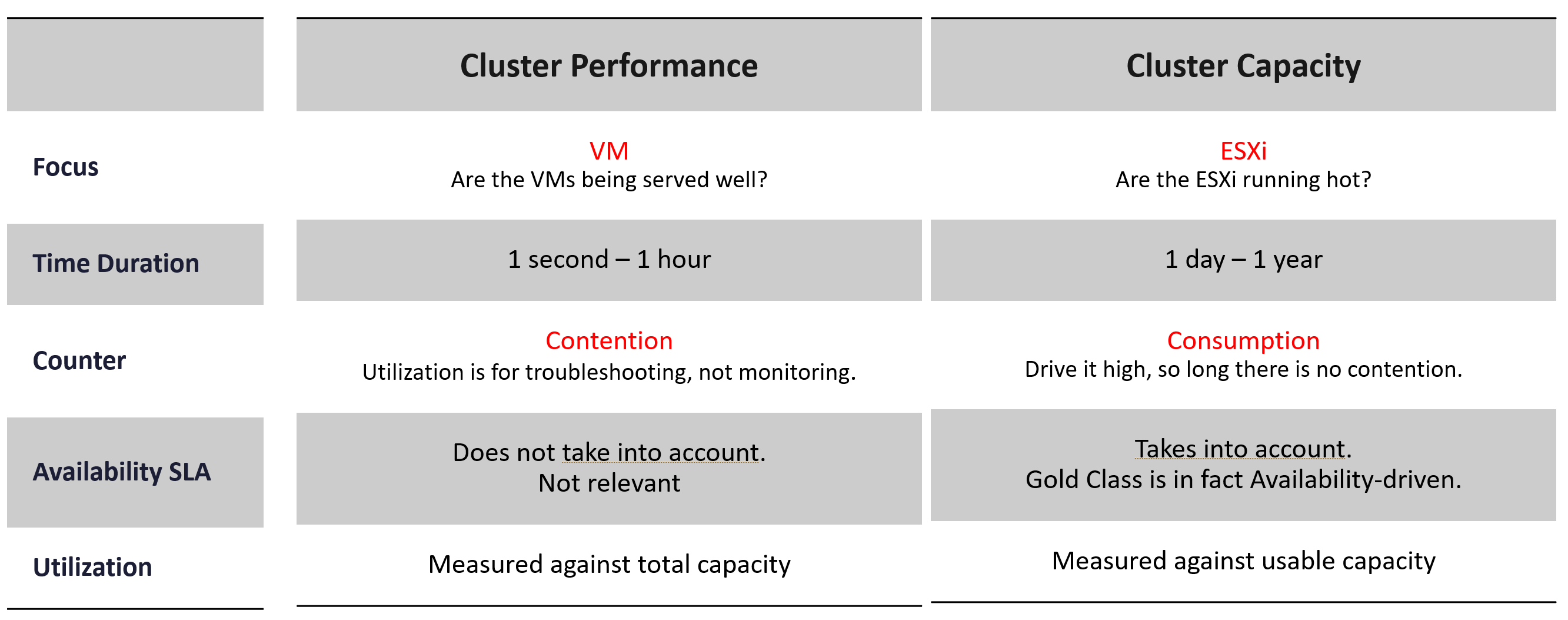
The relationship between capacity and performance varies depending on the object.
-
Consumer objects (e.g. VM, K8S Pod) have different natures than provider objects (e.g. vSphere Cluster, vSAN Cluster).
-
For provider objects, performance is always bottom up. You start with the VM running inside in the provider object, and then aggregate the metrics. Capacity is always top down. You look at the big picture first, then drill down. For example, you start with the vSphere cluster, then drill down to ESXi.
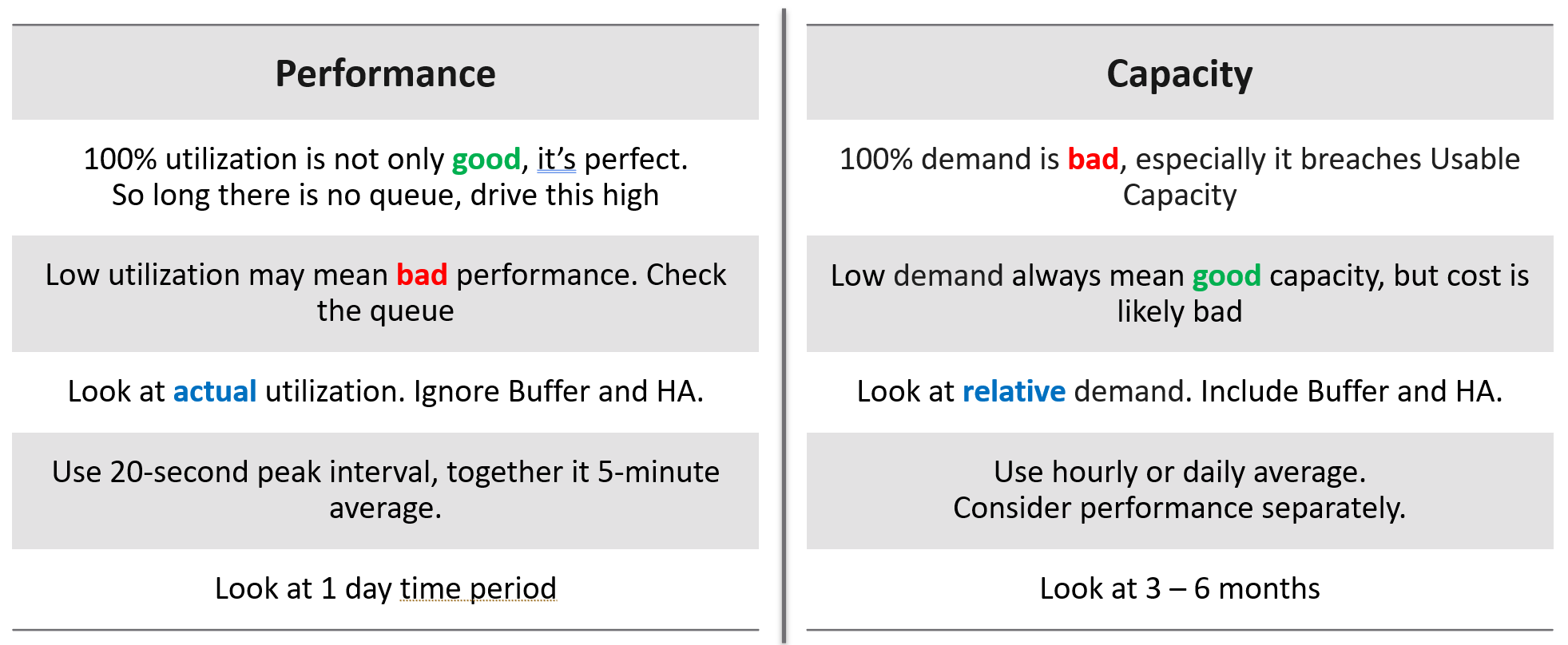
For an IaaS provider, the following tables explains how performance and capacity differ.
Utilization vs Demand
Utilization is not something you manage. It is just an input to what you actually care, which is capacity and performance. The nuance is both use utilization differently. In addition, capacity uses demand metrics, which takes the highest of utilization & reservation.
Performance will be absolute (real value), Capacity will be relative (it depends on settings). Unlike performance, Capacity is measured against usable capacity, not absolute capacity. There is no such thing as usable performance.
Now that we’ve looked at purpose, now let’s look at object.
Take a 16-node vSphere cluster, for example:
-
For performance, taking the average utilization of 16 hosts is too late. It’s also not practical, as you don’t typically wait until all 16 have a problem. In this case, you want to take the highest among the host as your primary counter for cluster utilization. If the counters show no issue, then there is no need to look at the remaining hosts.
-
From capacity, taking the average makes sense, as you do capacity at cluster level. You will continue adding until either you run out of capacity or you hit performance problems.
Contention vs Consumption
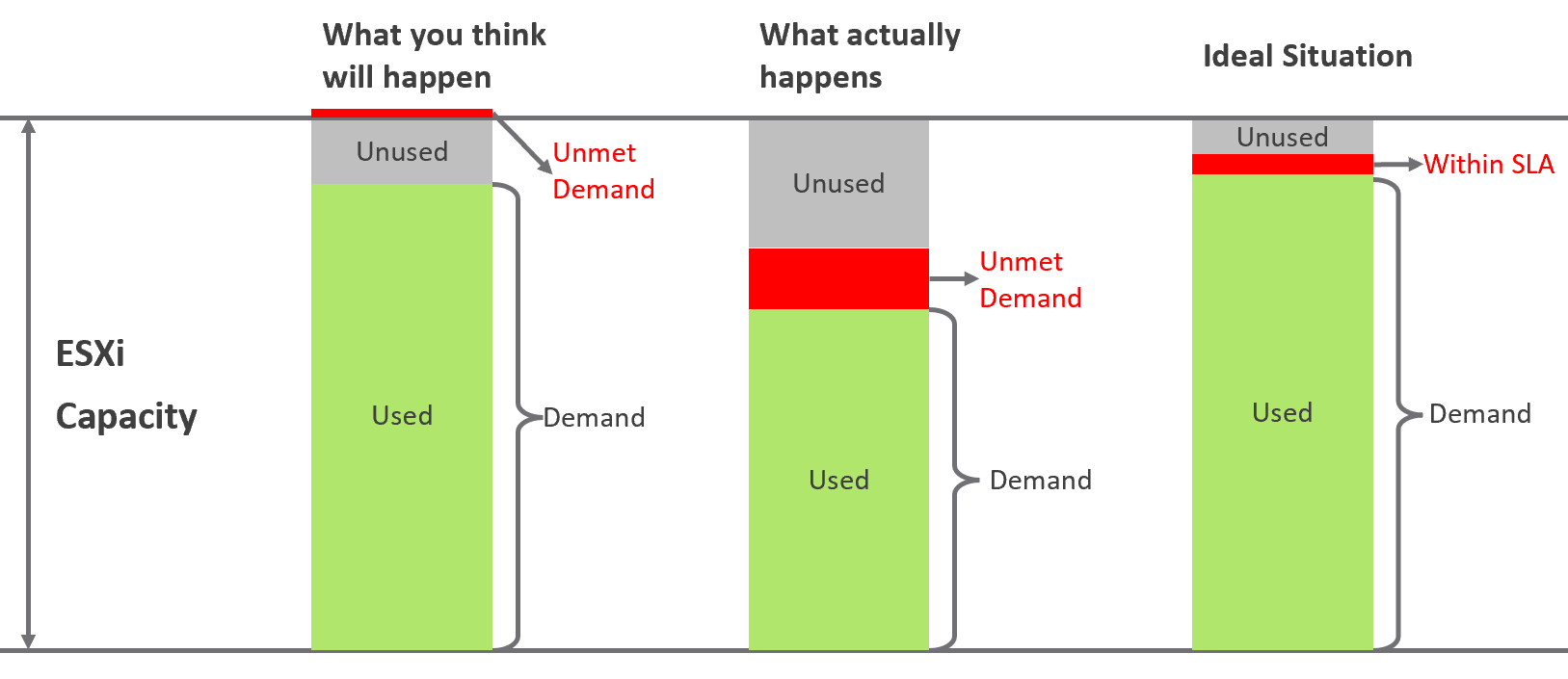
The following diagram shows 3 different scenarios on how contention and consumption can play out:
-
What you think will happen: you theorize that contention will only happen when utilization is high, and the unused capacity acts as cushion to prevent unmet demand from happening. This is unlikely as there could be imbalance.
-
What actually happens in most environments: demand is unmet even though utilization is not high, due to suboptimal configuration or constraints. Imbalances and incorrect cluster configurations are two typical causes of contention at low utilization.
-
What would happen if your environment is optimized: you have very high utilization yet you keep unmet demand within the promised SLA.
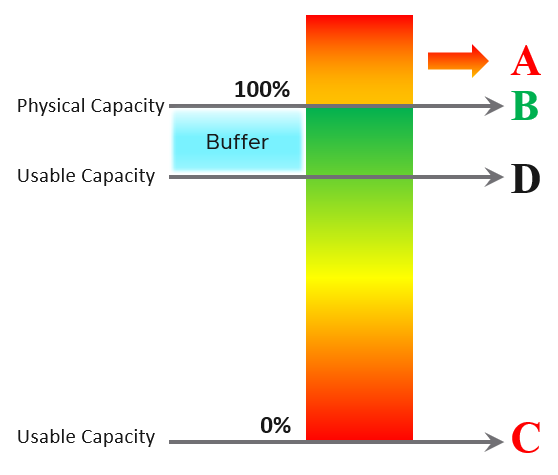
Don’t confuse “ultra-high” utilization indicators as a performance problem. High utilization does not compromise performance, so long as there is no queue or contention. Just because an ESXi Host is experiencing ballooning, compression, and swapping does not mean your VM has memory performance problems.
| A | It’s a common misperception that performance problems happen mostly here. It actually rarely happens here as utilization rarely exceeds 100% in real world due to buffer created by high availability. |
| B | Maximum utilization is achieved at 100% utilization. Consequently, the overall Performance is best here as the system completes the most amount of work. |
| C | Worst performance actually happens when utilization = 0% as nothing gets done. The demand is not being met at all (for whatever reason). |
| D | This is the threshold of Usable Capacity. It has nothing to do with Performance. Performance is in fact better above this threshold. |
Pattern Difference
You can’t forecast performance using capacity. Their metrics have different patterns.
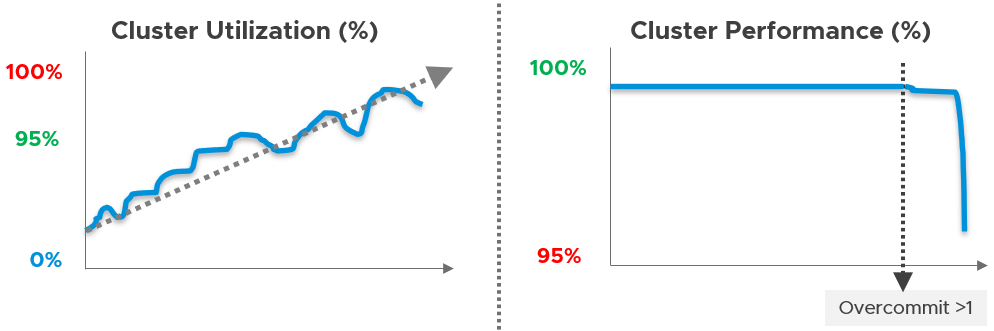
Let’s take an example to see how contention and utilization differ. The following is using a cluster object as the example. There are two metrics, each expressed in percentage.
You want your utilization to be as high as possible, as you’ve paid for the hardware already. So, you start from 0% but want to move up as far as possible.
Performance is different as it depends on the class of service. Your Gold Class should deliver higher performance than your free tier else you may breach your SLA. Metrics wise, there are 2 metrics: SLA and KPI.